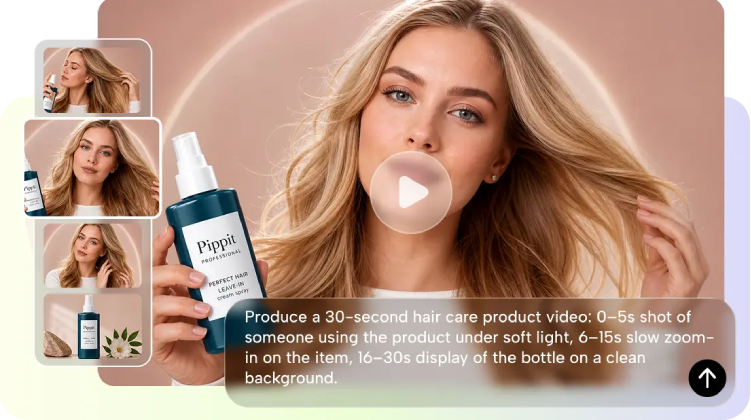
When every moment created with AI is part of the same story, AI video can be a viable storytelling tool. Creators can create scenes with intentional movements and progression rather than using individual clips. Pippit is a generation and editing tool to create structured visual concepts. It features a workflow for references, timing, motion, extensions, and scene planning. These skills are used to create short advertisements, dramas, product stories, and branded sequences.
How Modern AI Supports Visual Storytelling
Even a short video requires a beginning, a middle, and an ending to be considered a complete video. A 30-second sequence can establish context, build action, and provide a satisfying pay-off. Realistic motion also helps actions flow naturally, rather than as distinct visual events. Depending on your idea, you can use an AI video generator that begins with text or reference images. Text-to-video is a process that starts with a written direction, and image-to-video is a process that starts with a visual asset. Pippit can be used for concept development as well as for final presentation in a single workflow. Then Pippit offers editing controls to tweak the created sequence. The prompt should be clear and include subjects, action, setting, camera movement, and desired visual style.
Structure Narrative Timing With Audio Cues
Complementing the flow of the story is essential to good visual storytelling, as is sound. SeedAudio 2.0 allows you to create dialogue, ambience, sound effects, and music, as well as direct when key audio moments are going to happen. Time-tag dialogue, effects, or music cues to occur at specific times in the sequence. The reference audio can ensure a consistent character voice, and the video-aware generation can match the soundscape with existing video footage. The ability to have separate tracks for dialogue, ambience, effects, and music also provides you with more control during the editing process. It is a way to relate visual actions with meaningful sounds, resulting in more coherent, paced, and complete scenes.
Steps to Enhance Storytelling Capabilities Using Seedance 2.5 Narrative Tools
Step 1: Build Your Story Foundation
- Sign up for Pippit by using your Google, TikTok, or Facebook account info.
- Navigate to the “More” tab on the left vertical menu bar and click it to access “Video generator”.
- Select an AI model, such as “Dreamina Seedance 2.5” for your video generation.
- Enter a detailed text prompt describing your story, characters, scenes, and the way you want the video to look.
- If you want, select the video length, language, subtitles, and aspect ratio in which you want to generate the video.
- Click “+” to upload reference images or videos from your device, phone, Dropbox, or a link. You can also select assets if you don’t have reference media.
- Once everything is added, click “Generate”.
Step 2: Turn Ideas Into Scenes
- After clicking “Generate”, Pippit’s AI video generator automatically creates a video based on your text prompt and reference media.
- The AI handles editing elements like transitions, pacing, captions, avatars, voice, lyrics, and visual enhancements.
- You will receive a video draft to review and check whether the scenes, pacing, and visual elements support your story.
Step 3: Strengthen the Narrative
- You can click on the “Download” tab in the top right corner to save it to your local device. You can also click on “Regenerate” if you don’t like your video. To edit the generated video, you can click the “Edit more” tab present right under the video to open the Pippit editing interface for further customization.
- Customize your video by editing captions manually, adding text, and adjusting size, color, alignment, filters, and effects.
- You can also add background music, remove backgrounds, and fine-tune the visuals to make the story more engaging.
- When your video is ready, click “Export” in the top right corner.
- Select “Publish” to post directly to TikTok, Instagram, or Facebook, or click “Download” to save the video with your preferred format, resolution, frame rate, and quality.
Six Narrative Tools for Building More Connected AI Stories
Pippit is a suite of narrative capabilities that all work together for connected visual storytelling projects. Each capability focuses on a specific component of planning, generation, or refinement. Combine them when a concept requires more continuity and controlled progression.
- Story Studio: Arrange characters, roles, scenes, and sequences of the story on a creative canvas.
- Timestamp Direction: Give actions, camera changes, and visual developments a time.
- Reference Inputs: Image or video of products, characters, environments, composition, or style.
- Footage Extension: Extend selected footage when an action or a moment in the story requires more development.
- Camera Movement: Use terms such as pans, tracking shots, close-ups, wider shots, etc. to describe the types of movements that are made by the camera.
- Green-Screen Editing: Use green-screen to swap out built backgrounds if the scene calls for a different background or campaign.
Build Spatial Continuity Across Scenes
For connected stories, the environments and scene elements need to be visually consistent with the various shots. Seeworld is a more general 3D world-modeling approach based on spatial relations between environments, objects, characters, and viewpoints. You can use this concept as a guide to planning scenes before creating final video content. Consider how objects are placed in the foreground and background, how big or small characters are, how deep the scene is, and the perspective of the camera. A spatial workflow can also be used to investigate various perspectives and maintain key elements. Planning the environment and relationships first will create stronger visual references for multi-scene videos and continuity as the story unfolds.
Strengthen Story Progression With Cinematic Motion and Story Studio
Movement of the camera can focus attention and can also be used to aid character action, object movement, and environmental changes. Tracking shots can show movement, and close-ups can show reaction, product, or significant detail. In broader shots, the setting and the connection between the person or objects are determined. Story Studio offers a framework for character development, scene sequence, setting, and significant events. Draw links between events before creating sections to ensure visual continuity. Start with a starting setup, build on moments, and end with a significant ending. Pippit is the blend of purposeful movement and organized story planning for multi-scene concepts.
Refine AI-Generated Stories Before Final Export
Check each draft for continuity, pacing, visual correctness, clarity of narration, and key product information. Revitalise weak scenes where actions, composition, character appearance, or timing are not in line with the story. Manual editing can enhance captions, text placement, colors, effects, music, and background treatment. Focus on transitions, where individual scenes connect. Transitions: tweak where bits of generated material may seem abrupt or disconnected. Review product packaging, character styling, environment details, and visual branding prior to publication—only export when the sequence is clearly communicating its beginning, development, and resolution.
Conclusion
Pippit’s narrative workflow enables creative ideas to be translated into a visual sequence with direction and structure. Timestamps are used to mark key moments, and references provide helpful visual context for generation. Camera movement helps to reinforce the progression, and footage extensions help to continue the actions from the initial sequence. Story Studio adds space for planning out characters, scenes, and longer concepts. Then moments are brought together in a polished final story through careful editing.